Locked Candidates in Sudoku: Pointing Pairs & Claiming
Locked Candidates are often the first technique that makes an intermediate Sudoku feel genuinely different from an Easy puzzle. The pattern appears when every remaining candidate for one digit inside a 3×3 box lies on the same row or column. That alignment lets you remove the digit outside the box. The reverse version also works: if every candidate for a digit in a row lies inside one box, the rest of that box cannot contain the digit. These two forms are called pointing and claiming, and both turn simple candidate positions into reliable eliminations.
When every route for a digit passes through one line, that line becomes a logical lock.
What are Locked Candidates?
Locked Candidates describe an interaction between a 3×3 box and a row or column. In a pointing pair or triple, a digit has two or three possible cells inside one box, and all those cells share a line. The box must place the digit somewhere on that line, so the same digit can be removed from the rest of the line outside the box. In claiming, start from the line: if every possible position for a digit in a row or column falls inside one box, that box must receive the digit from the line, so other cells in the box lose that candidate. The digit does not need to be solved yet; only its location is restricted enough to create an elimination.
How to find pointing and claiming patterns
- Choose one candidate digit. Scan one number at a time, preferably a digit with relatively few remaining positions. Trying to compare all nine candidates at once hides the alignment.
- Check each box for a single-line alignment. If every candidate for that digit in a box sits on one row or one column, you have a pointing pair or pointing triple.
- Eliminate only beyond the box. Remove the digit from other cells on the shared line outside the source box. Keep the candidates that form the lock until another deduction resolves them.
- Reverse the scan for claiming. Inspect a row or column. If all of its positions for the digit lie inside one box, remove that digit from other cells in the same box.
- Rescan the affected units. A locked-candidate elimination often creates a Hidden Single, Naked Single, or pair. Take that easier consequence before searching for another advanced pattern.
Worked example: a pointing pair for candidate 5
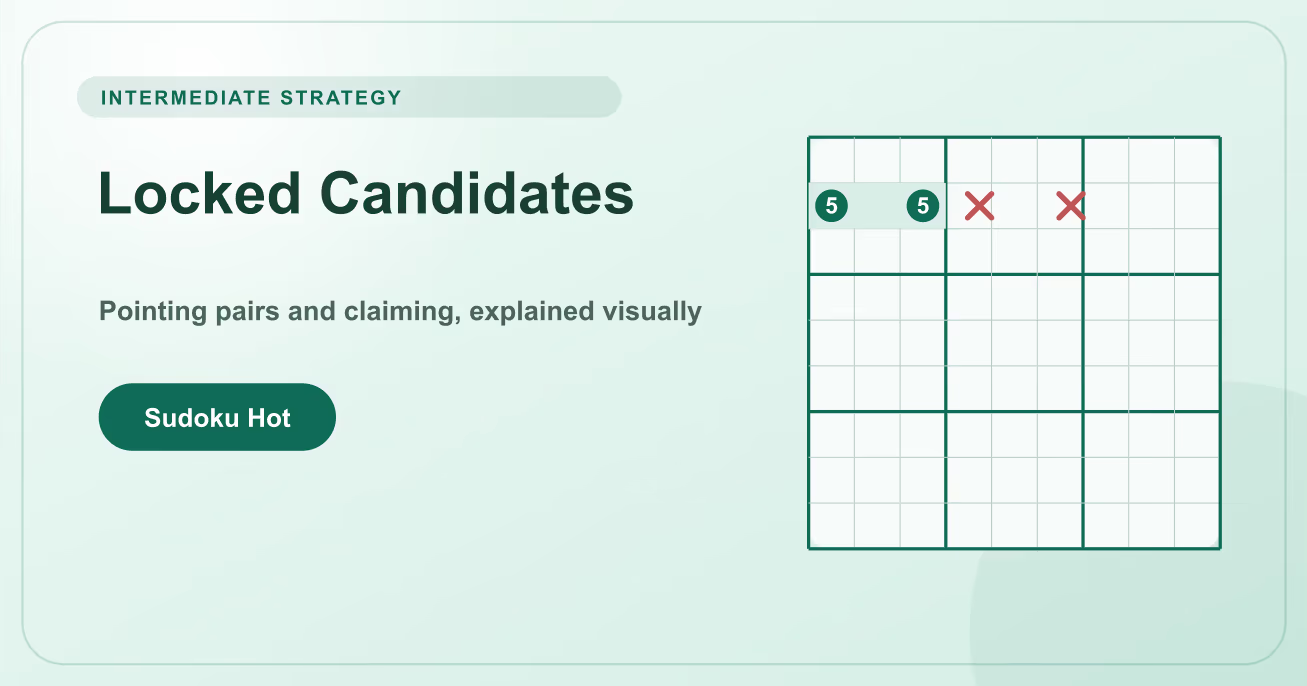
In the top-left box, suppose candidate 5 appears only at r2c1 and r2c3. Both cells sit in row 2. One of those two cells must eventually contain 5 because the box needs exactly one 5, so row 2 cannot place another 5 outside the box.
- Confirm the source box. Check all nine cells of the top-left box. Candidate 5 must be absent from every unsolved cell except r2c1 and r2c3. A third 5 anywhere else in the box breaks the pattern.
- Name the locked line. The two surviving candidates share row 2, so the box will supply row 2 with its 5. You do not need to know whether r2c1 or r2c3 is correct.
- Remove candidates outside the box. Delete candidate 5 from r2c4 through r2c9 wherever it appears. Do not delete either member of the pointing pair and do not touch 5s in unrelated rows.
- Follow the result. If r2c7 was {5,8}, it now becomes 8. Place 8, update its row, column, and box, then look again for singles before continuing the locked-candidate scan.
Common Locked Candidate mistakes
Using only two matching notes
Two candidates in a box are not enough if the same digit can also appear in another row or column of that box. Every candidate for the chosen digit must share the locked line.
Eliminating in the wrong region
Pointing removes from the line outside the box. Claiming removes from the box outside the line. State the source region and target region before deleting anything.
Trying to solve the locked cells
The pattern proves where the digit cannot go, not which aligned cell is correct. Keep both or all three source candidates until another rule decides between them.
Locked Candidates practice checklist
- Choose a candidate digit and scan all nine boxes for positions aligned on one row or column.
- Say “box points to line” for pointing and “line claims box” for claiming before each elimination.
- After an elimination, check the target line and box immediately for singles or newly exposed pairs.
- Use Undo if an elimination creates a duplicate later, then verify whether a hidden third candidate invalidated the lock.
Locked Candidates reward a disciplined scan more than fast pattern recognition. Practice on Medium Classic puzzles: mark one digit, inspect box-to-line alignments, make only the supported eliminations, and then return to singles. That loop turns a technique that initially feels abstract into one of the most dependable tools in your solving order.
Locked Candidates FAQ
Is a pointing triple weaker than a pointing pair?
No. Two or three candidates aligned on one line produce the same outside elimination. What matters is that every possible position for the digit inside the box lies on that line.
Do the locked cells need identical candidate lists?
No. They only need to share the candidate being studied. For example, {2,5} and {5,7,9} can support a pointing pair for 5 if no other cell in the box can contain 5.
Are Locked Candidates the same as box-line reduction?
Box-line reduction commonly refers to the claiming form. Many guides use Locked Candidates as the umbrella term for both pointing and claiming interactions.
Which difficulty usually requires this technique?
It often appears in Medium and Hard puzzles. Easier grids may contain the pattern but usually offer enough singles that you do not need it to finish.
Can the same logic use columns?
Yes. Rotate the reasoning ninety degrees. Candidates aligned in one column inside a box remove that digit from the rest of the column, and a column can claim a digit inside one box.